Technical Terms
Here we explain technical terms that are used in the document.
- AAD (Azure Active Directory)
-
Microsoft enterprise identity service provides single sign-on and multi-factor authentication to help protect
your users from 99.9 percent of cybersecurity attacks.
AAD Definition Reference
- Tenant
-
A directory in AAD in which the user base is stored.
In this document you may find references to two types of tenants: B2C and B2E
- B2C Tenant
-
Stands for Business-to-Consumers. When we say "the B2C tenant", we mean the AAD tenant which
houses non-employee accounts in EagleID.
EagleID provides three B2C tenants, DEV,UAT, and
PROD.
The B2C Tenants have functionalities, called "policies", which handle human authentication scenarios. Some
examples are SignIn, SignUp, and ForgotPassword.
- B2E Tenant
-
Stands for Business-to-Enterprise. When we say "the B2E tenant", we mean the AAD tenant which
houses employee accounts at First American. We can utilize EagleID's platform to authenticate these users as
well.
There is a single B2E tenant (Prod) at First American. It houses employee accounts and also holds application
registrations used in Service-to-Service Authentication.
- JWT (JSON Web Token)
-
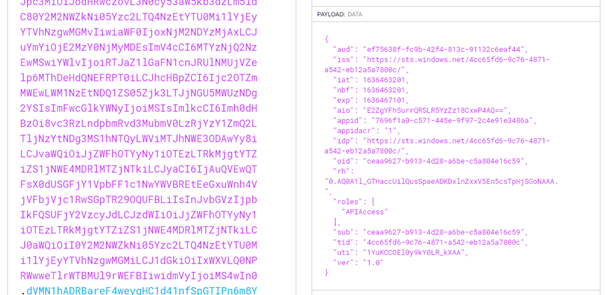
JWT is an open standard for tokens used in the authentication process. Refer here for more information.
The JWT is an encoded token which can hold information securely in attributes called "Claims". An example JWT
can be seen at the link above.
- Consumer
-
The application being integrated with DCIS, consuming the API.
- User
-
The human user of the consumer application, identifiable by username / email address.
DCIS Functionalities
DCIS API was designed to centralize the process of user creation (by inviting your users) and migration. It
basically is responsible for managing users of integrated application. In the future, DCIS will also handle mass
notifications for all app users.
When integrating with DCIS, the consumer application utilizes a DCIS API route to invite users to their
application.
Authentication/Authorization and User Binding
The EagleID AAD is an external Identity Provider that keeps all data of the user and his profile (like user first
& last name, email address, phone number and username). The EagleID platform handles
who
the user is
(authentication), while the consumer application is responsible for what the user can do (authorization).
This means, when integrated with EagleID (and DCIS) the consumer application still maintains a user entry in its
own database. For example, if a consumer application has 10 users in their DB prior to migration, they will still
have 10 users in their DB after migration. Migration will be accomplished by inviting users to your application
through the DCIS API. After each SignIn action, the consumer application receives a JWT in which there is a claim
called IDaaSID that uniquely identifies the user. This token claim will be used in your user DB to tie the EagleID
to your current authorization model.
Tokens created for services (B2E tenant) do not have IDaaSID claim, but instead contain an AppID claim.
DCIS API Authentication
Before we define the process itself, let's take a look at how your app (the consumer app) can communicate with
DCIS API. DCIS API is a protected API and requires Bearer Authentication to validate the caller and authorize. If
your token was indeed issued by the IDaaS team and we also recognize it in our DB, then the call is authorized.
Please see the below paragraph about the integration process for details on how to make a service-to-service call
with a JWT (B2E).
Diagram of Communicating to DCIS
How to retrieve a Bearer Token to authorize calls to the DCIS API
If you're using .NET, we highly recommend using the library MSAL.NET. The official NuGet package name is
Microsoft.Identity.Client. Using this library, you can easily retrieve a Bearer token, by giving your ClientId,
and ClientSecret. Here
is some sample code:
      using Microsoft.Identity.Client;

      private async Task<AuthenticationResult> GetAccessTokenToDCISAPI()
      {
          var ClientId = "{your B2E ClientId here}";
          var clientSecret = "your client secret for ClientId";
          var B2ETenantId = "4cc65fd6-9c76-4871-a542-eb12a5a7800c"; // B2E tenant

          var app = ConfidentialClientApplicationBuilder.Create(ClientId)
              .WithTenantId(B2ETenantId)
              .WithClientSecret(clientSecret)
              .Build();

          // ef75638f-fc9b-42f4-813c-91132c6eaf44 is DCIS API DEV registration
          string[] scopes = new string[] { "ef75638f-fc9b-42f4-813c-91132c6eaf44/.default" };

          return await app.AcquireTokenForClient(scopes).ExecuteAsync();
      }
This method will return an AuthenticationResult object which contains an AccessToken.
You will need to utilize this Access Token in the "Authorization" HTTP Header as such:
Authorization: Bearer {AccessToken}
You can utilize the website JWT.io to decode the token and see some of its claims
in the Payload section.
All HTTP calls to the DCIS API will need to include such a JWT in the HTTP Authorization header.
Business scenarios & flow
1. Invite new user scenario
Summary
The most common scenario for new user creation is via an invitational email with a link for the user to create
their new account. This scenario has to be implemented, since it covers all scenarios (like new user with or without existing EagleId account). This is a high level summary of the process flow:
- A Client Representative invites a new user to the application by providing an email address
- The application adds new user data to DB
- User receives an email invitation with a link to click to your application
- The user proceeds with EagleID creation or SignIn with an existing EagleID
- Application receives data from Identity Provider (EagleID) about user's created/existing account
- Update data in DB to connect DB user with IdaasId of EagleId account
Detailed Implementation Steps
To implement described scenario, when all prerequisites described earlier are met, one should implement the
following changes:
Initial Onboarding Changes
The Consumer application will have to alter its current Onboarding process. When onboarding a new user your
Client Representative (or other admin) provides an email address in some sort of admin panel. From this point,
store this (partial) user object in the DB. Then, the consumer app should make a call to DCIS API endpoint
                POST
                /api/{clientid}/invitations
with data in contract (check the contract on DCIS API Swagger page) like first/last name,
email
address and “IndividualId”. Once this is done, DCIS API will generate and send a “brand-specific” email to invite
the user.
NOTE: “IndividualId” is a value that uniquely identifies the user in consumer app
(probably just an ID value from Users table).
As a response to that call, DCIS API will return the invitational token with expiration date. The consumer app can
store the token & date and validate if they prefer. Alternatively, the consumer app can call the DCIS API when the
user clicks the invitational email link to check if the invitational token is valid. To check if received token is
valid, use GET /api/{ClientId}/invitations/{invitationalToken}.
SignUp Page
On your SignUp endpoint (provided to DCIS in the initial email) consumer app should read the query parameter:
-
token - this is the invitationalToken value that was created when the invitation was created to uniquely
identify the invitation.
That value allow the consumer app to validate if the invitation is still valid by querying DCIS. And to what user it is
associated (IndividualId in response from DCIS).
NOTE: If you need your IndividualId after the user has gone through EagleID SignUp,
it can be included in an optional “claim” called “AppData” as a JWT token. Please speak with either the EagleID
team or the DCIS team for further help on this topic.
Main Page Endpoint:
On your main page endpoint (also provided to DCIS in the initial email) consumer app should behave differently based on if the call is authenticated or not:
Unauthenticated Call (that contains query param):
On the “Main Page” endpoint, the consumer app should look for the same query parameter as in SignUp page:
-
token -this is the invitationalToken value that was created when the invitation was created to uniquely
identify the invitation.
If receiving an unauthenticated call that contains "token" query parameter,
this means the user wants to
associate an existing EagleId account. First, validate the token and expiration time (by callind DCIS endpoint). Then, challange the sign in policy with individualId set into the signing request.
Once the SignIn is completed, you can bind the user record (retrieved by IndividualId) to the IDaaSId value from authentication token received
from EagleID.
NOTE: Similar to SignUp, if you need your IndividualId or token after the user has
gone through EagleID SignIn, it can be included in an optional “claim” called “AppData” as a JWT token. Please
speak with either the EagleID team or the DCIS team for further help on this topic.
Authenticated Call:
When received authenticated call that means the user logged in. If that user logged in the first time, consumer app needs to bind his IdaasId
(from token) to the correct id (individualId) in the database.
On the “Main Page” endpoint (sent to DCIS in email) when receiving an authenticated call check if the
authenticated
user token contains the claim “newUser” set to True. If so, this is a newly created user and the consumer app
should bind EagleID user with DB user (check Authentication/authorization and User Binding).
If authenticated call contains Individualid send by your app (check unauthenticated above) that means user logged in for the first time
(he used existing EagleId account when received invitation) and exactly like in case of new user we need to bind IdaasId from received token to the IndividualId.
After User Binding
Once the binding is completed, the consumer app should make a call to the DCIS API to "complete" the invitation
at DELETE /api/{ClientId}/invitations/{invitationalToken}
This tells DCIS API that the invitation has been finished and we can mark invitation as complete and connect the
invited user to the consumer app in DCIS DB.
As a summary, flow will look like this:
- Create user in DB (or pick one existing that isn't migrated)
- Call DCIS POST /api/{clientId}/invitations
- If invitation created (see other responses of the endpoint below) wait till user will use link in invitation email they recieve
- When receiving call to SignUp url read invitational token (link from invitational email)
- Confirm if the invitational token is valid (by calling DCIS GET /api/{clientId}/Invitations/{invitationalToken})
- If token is valid challange SignUp for the user (including user identifier - individualId or invitational token in the http call)
- When receive authenticated call to main page Owin pipeline when detecting this is new user creation shall bind the user
- Now the user can login using his EagleId account
Responses of DCIS endpoint POST /api/{clientid}/invitations
Response of posting invitation can be different, depends on things like invitation already exists, is it valid, is the invited person employee etc. Possible correct responses are:
- 201 (Created) response - this response is returned, alongside the model of the invitation in case DCIS created the invitation.
- 201 (Created) response - DCIS will return 201 also in case, the invitation already exists but it's expiration time passed. DCIS will refresh the existing invitation - will modify the expiration date - and will return 201 with the model of refreshed invitation.
- 302 (Found) response - this response is returned for all concurent calls for the same email address, first name, last name and individualId. I.e. as long the invitation exists, and as long it is valid, DCIS will not create another one. DCIS will return 302 with a link (in locations response header) to url where existing invitation can be retrieved
GET /api/{clientId}/Invitations/{invitationalToken}. Please note, that web browser automatically does the redirect of 302 response location header, so when using swagger UI it is not obvious that DCIS returns 302.
- 302 (Found) response - 302 is also returned when DCIS will receive invitation for an employee, and the flag
InviteIfEmployee in the payload model is set to false. The DCIS will return 302 with a link (in locations response header) to employee endpoint, i.e. GET /api/Employees/{user}. If flag InviteIfEmployee will be set to true, DCIS will create invitation as normal.
- 302 (Found) response - 302 is returned also when invitation for given user (email, first name, last name and individualId) was completed. That means, the user is already migrated. So 302 redirect points to
GET /api/{clientId}/Users/{emailAddress}.
2. Auto-migrate DCIS user scenario
Summary
Alternative scenario is to "auto-migrate" users, that were already migrated by any other app integrated with DCIS. This is optional scenario, and can only extend Invite new user scenario.
DCIS can provide information about EagleId accounts created for given email address, so consumer app by using this scenario can automatically bind EagleId account with given user in their database.
This is a high level summary of the process flow:
- A Client Representative invites a new user to the application by providing an email address
- The application adds new user data to DB
- Based on DCIS response the application update data in DB to connect DB user with IdaasId of EagleId account
- It's up to the application to notify user about migration
Detailed Implementation Steps
To implement this scenario application should support scenario Invite new user scenario and use it in case migrated user wasn't migrated already by any other application. No other prerequisites are necessary.
Flow will look like this:
- Create user in DB (or pick one existing that isn't migrated). Alternatively this can be triggered upon user singing in the old way.
- Call DCIS GET /api/Accounts/Users
- If DCIS response says user
hasEagleIdAccount is set to true and knownAccounts are given (see swagger UI to check contract) auto-bind user.
- Let know DCIS that this user is using your application by calling DCIS POST /api/{clientId}/Users
- Notify user that they have been migrated
- Now the user can login using his EagleId account
NOTE: Please note that email address isn't unique so for given email address there can be many created EagleId accounts. That's why DCIS GET /api/Accounts/Users returns list of knownAccounts.